Connect  OpenClaw
 Claude
 CodexOpenClaw
to your apps — without losing control.
Manage permissions, approve sensitive actions, and safely connect agents to your apps.
 Gmail
Gmail Notion
 Dropbox
 HubSpot
 Trello
 GitHub
 AirtableGmailNotionDropboxHubSpotTrelloGitHubAirtable
Open-source. End-to-End Encrypted. Credentials and keys stay on your devices. No sign-up required.
Connecting agents directly to apps gets messy fast
- Every agent needs their own access keys.
- Permissions live in different dashboards.
- Pausing means chasing API keys across apps.
- New agent — new headache.
It works with one agent and one app.
With a few, it becomes chaos.
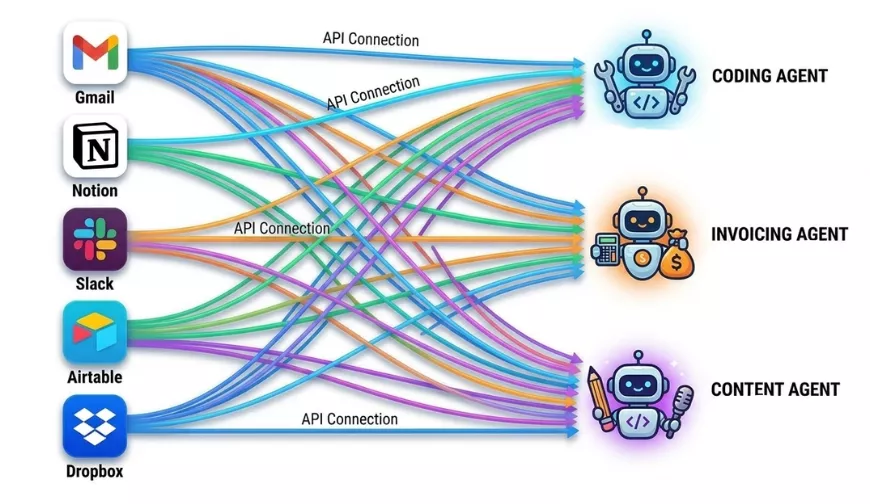
Many agents × many apps = access sprawl
Connect apps once. Control everything from one place.
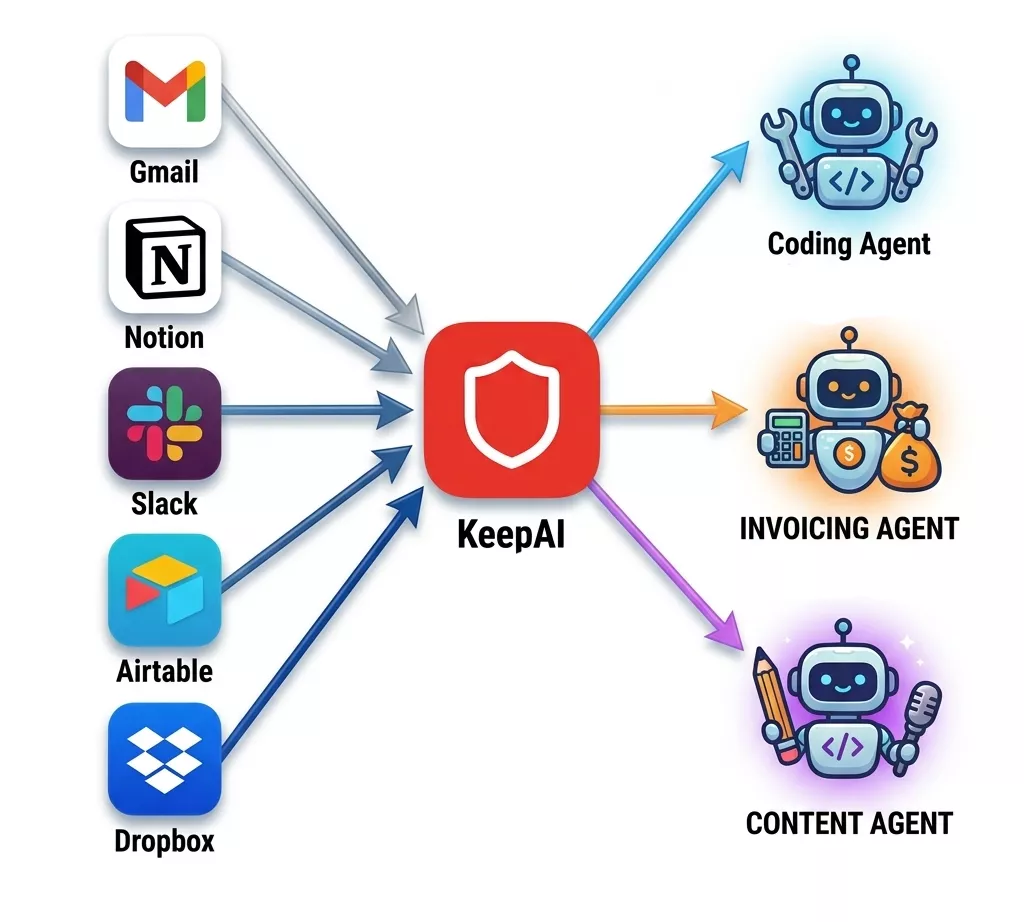
- KeepAI sits between your agents and your apps.
- Instead of giving each agent direct access, they connect through KeepAI.
- You stay in control while agents still get the tools they need.
- Add more apps and agents easily, revoke access instantly.
- Track what agents are doing, approve sensitive actions.
One place to manage how agents access apps.
Setup once. Benefit daily.
Agents automate tasks. KeepAI manages the access.
One control layer for all your agents
Instead of managing app access separately for every agent, control everything from one place.
Try new agents without reconnecting all apps
Connect apps once, then decide what each agent is allowed to do.
Pause a misbehaving agent instantly
Stop access in one click instead of hunting through API dashboards.
Give agents exactly the access they need
Most apps offer very coarse permissions. KeepAI lets you narrow them down.
Approve important actions
Let agents automate the routine stuff. Force approval on sensitive actions.
Real-time notifications
Know when agents request approvals, trigger blocked actions, or perform important tasks.
Track what agents do
See exactly what actions agents performed and when.
Built for real multi-agent setups
What works with one agent gets messy with three. KeepAI keeps things manageable.
Keep keys on your device
Your tokens stay local, and agent connections are end-to-end encrypted.
Agents without guardrails are scary.
Your fears are real. Many people share them on
Summer Yue
@summeryue0
Nothing humbles you like telling your OpenClaw “confirm before acting” and watching it speedrun deleting your inbox. I couldn't stop it from my phone. I had to RUN to my Mac mini like I was defusing a bomb.
Gappy (Giuseppe Paleologo)
@__paleologo
How many of you link Gmail to OpenClaw? Isn’t it a little scary to delegate authority to it?
Yuchen Jin
@Yuchenj_UW
Man, I admire the brave people who give OpenClaw write access to their Gmail, Slack, and their Mac Mini.
I’m scared it’ll delete all my emails, write crazy emails to investors at 3am, and pivot my startup without telling me.
Maybe that’s why I don’t see the use case for me…
Xiao Ma
@infoxiao
Those who give @openclaw email access — what’s preventing it from clicking “forgot password” then using the verification code it got in the email to lock you out? I give it lots of things including its own Gmail account. But still too scared to give it actual access to my main email.
Three steps to safe app access.
Install KeepAI
Download and run on your trusted device.
Connect your applications
Link the apps you want to protect.
Connect agent
Your agent interacts with apps within controlled permissions.
All agent actions go through KeepAI before reaching your applications
Direct Access vs KeepAI
Direct Access
- Every agent gets its own credentials
- Permissions scattered across apps
- Hard to see who can do what
- Revoking access takes time
KeepAI
- Connect apps once
- Control access for every agent
- Approve sensitive actions
- Revoke access instantly
Built for trust.
Zero compromise.
KeepAI is designed so that no one — not even us — can access your credentials or your data.
Fully Open Source
Every line of code is public and auditable. No black boxes, no hidden logic — trust through transparency.
End-to-End Encrypted
All data in transit and at rest is encrypted. Your policies and configurations are unreadable to anyone but you.
Hardware-Level Isolation
AI agent and your credentials run in isolated environments. A compromised agent cannot reach your accounts.
Credentials Stay on Your Device
Your tokens and secrets never leave your machine. KeepAI never sees, stores, or transmits your credentials.
You Control Access. Always.
Only your devices hold the keys to your apps. Revoke access instantly at any time, with a single click.
Full Audit Trail
Every action attempted or executed by AI agent is logged and visible to you — complete transparency, zero surprises.
Give agents autonomy, keep them under control.
Add a control layer between agents and your applications.
Connect once, manage easily, approve safely.
Common questions
No. KeepAI is a permission layer that allows OpenClaw to operate within defined policies. It sits between OpenClaw and your applications, enforcing what it can and cannot do.
No. KeepAI does not store your data. It enforces policies and logs actions — what was attempted and what was executed. Your credentials and application data remain on your device.
No. KeepAI is an independent product. All applications mentioned are trademarks of their respective owners. KeepAI is not affiliated with, endorsed by, or sponsored by OpenClaw or any application vendor.
Yes. KeepAI is designed to control permissions across multiple applications simultaneously. Connect Gmail, Notion, Google Drive — all managed from a single policy layer.
An app is one connected application account. For example: one Gmail inbox, one Google Drive account, or one Notion workspace. Each connection counts as one app slot in your plan.